
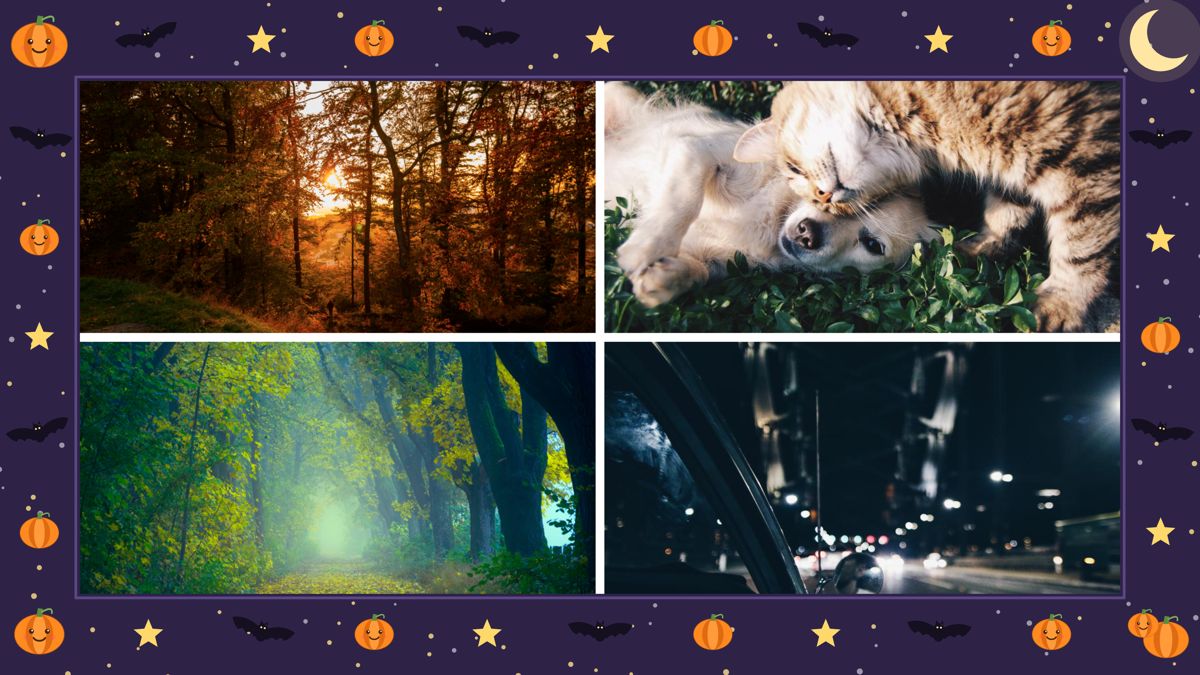
Halloween leaves you with forty photos of the same three costumes, half of them dark, and one shaky clip of the kids going door to door. Posting all of it is too much. Posting one photo misses the night.
A collage fixes that: the best six or nine shots in one picture, with a frame that says which night it was. Here's how to make one on iPhone with Photo Collage (on the App Store as Collage Maker: Photo & Video). Version 3.0 added a Halloween frame with pumpkins, bats and a moon, which is what the image above shows.
1. Pick the size first
Decide where the collage is going before you add anything, because the size changes which layouts look good.
- Instagram feed: 4:5. It fills the most screen without getting cropped.
- Stories, Reels covers and phone wallpapers: 9:16.
- A group chat or a card: 1:1, 3:4 or 2:3. Print sizes and custom sizes are part of Premium.
You can change the size later, but starting with the right one saves you from rearranging everything.
2. Add all your photos at once
Select every photo you might want in one go. They fill the cells in order, and the ones that don't fit wait in Extras below the collage. Switch to a layout with more cells and photos move in from Extras on their own. Switch to fewer and they move back out. Nothing gets lost while you try options.
3. Choose a layout by photo count
There are 219 layouts. The picker opens on the number of photos you have, so with six photos you only see layouts with six cells. Honeycomb and masonry layouts suit a pile of costume photos where none is the obvious star. Film strip and polaroid layouts give a looser, printed look.
If a face gets cut off, tap the photo and use Fit whole photo. If two photos are in the wrong spots, press and hold one and drag it onto the other to swap them. The crop and filter move with the photo.
4. Add the Halloween frame
Open Style, then Frames, then Seasonal. Halloween sits next to Autumn leaves and Winter holidays. The frame goes around the whole collage, so your photos stay as they are.
Frames look best with a little space between the photos. In Controls you can set the spacing, round the corners and pick a border colour. A dark purple or black border goes with the Halloween frame better than white.
5. Fix the dark party photos
Halloween photos are mostly taken at night or indoors. Before you save, open Adjust and brighten the darkest ones. Filters can go on one photo or on all of them, so a mix of porch-light and kitchen-light shots ends up looking like the same evening.
6. Turn a costume into a sticker
This is the part kids like most. Pick a photo of someone in costume and turn the person into a cut-out sticker, then place the little witch or dinosaur on top of the collage. It needs an iPhone with iOS 17 or later. Three cut-outs per collage are free, more need Premium.
Add a line of text if you want: a name, the street, or "Trick or treat 2026". There are 41 fonts, with outline and shadow, so the text stays readable over a busy frame.
7. Use the clip too
Collages can mix photos and videos. Drop the trick-or-treat clip into a cell and it plays next to the photos. The saved collage is then a video, ready for Reels or the family chat.
8. Save it, and come back later
Every collage you save is kept in My collages, so you can open it again tomorrow and swap a photo without starting over.
Short on time? Say "Make a collage of my recent photos in Photo Collage" to Siri. The app opens with your latest photos in a layout that fits, and you add the frame from there. The Siri phrases work in English, Spanish, German and Chinese.
Limits to know
- Cut-out stickers need iOS 17 or later.
- Print sizes, custom sizes and more than three cut-outs per collage are Premium. Editing, the layouts and the frames are free, with no watermark.
- This guide covers the iPhone and iPad app. The Android version has a different feature set, without the Halloween frame.
- The Siri phrase only works in the four languages above.
Pick the size, drop the photos in, frame it, brighten it. Ten minutes on the night, and the best photos end up in one picture instead of forty.