
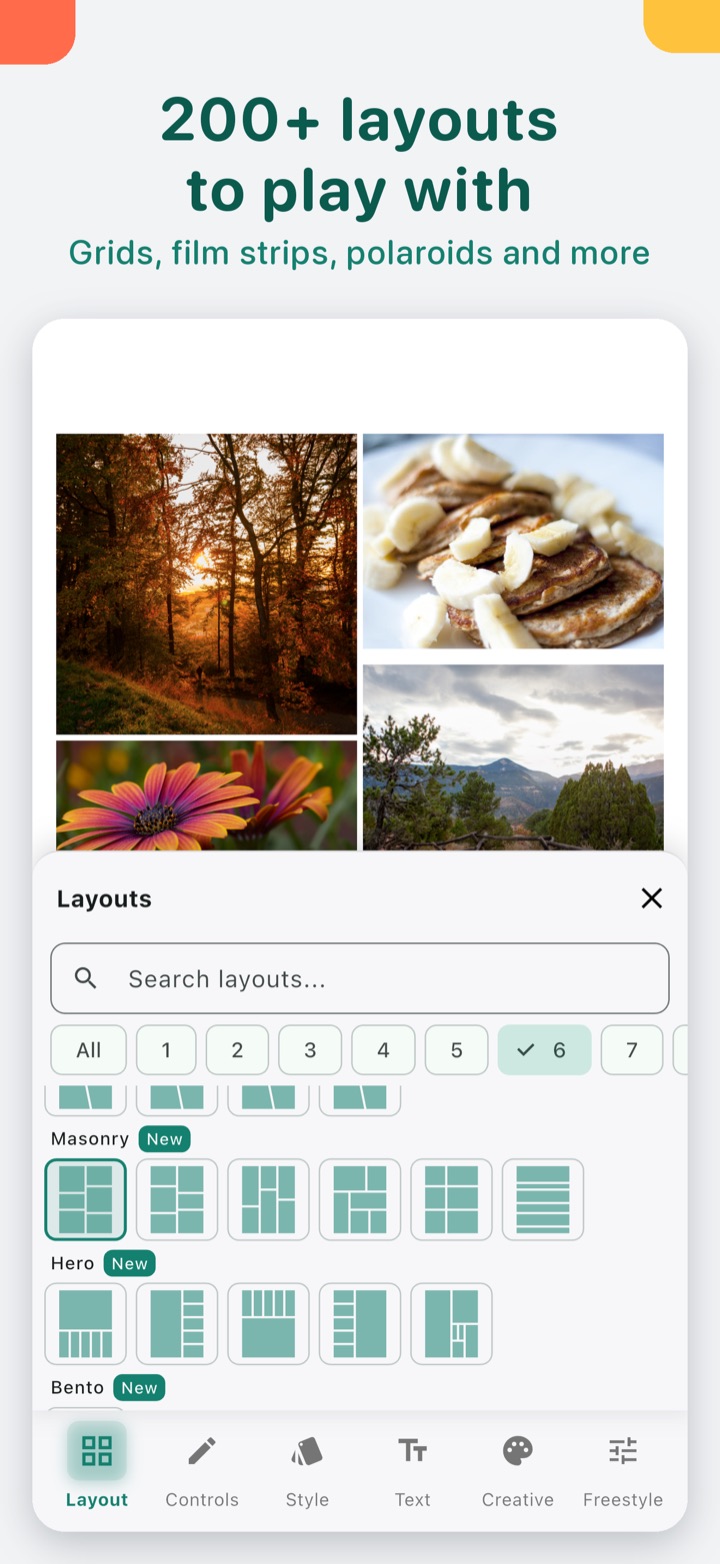
Short answer: if you want a PicCollage alternative on iPhone that doesn't put a watermark on your collage and doesn't need a subscription, Photo Collage is one option. It has 219 layouts, mixes photos and videos in one collage, and every editing tool comes with the app. There are no ads, and Premium is a single one-time unlock.
We make Photo Collage (on the App Store as Collage Maker: Photo & Video). This page compares what each app's App Store page lists as of October 2026, so you can choose the one that fits what you make.
Who Photo Collage suits
- You want to put a few photos in a nice layout for a post, a story or a birthday message, and save it clean.
- You'd rather pay once than keep a subscription running for something you do now and then.
- You mix short videos and photos in one collage.
If you mostly make greeting cards, slideshows, animated templates or doodles, PicCollage lists those on its App Store page and Photo Collage is built around collage layouts, so PicCollage may fit that better.
Side by side
PicCollage column: what its App Store page lists as of October 2026. "Not listed" means the page doesn't mention it, not that the app can't do it.
| Photo Collage | PicCollage | |
|---|---|---|
| Grid layouts | 219, incl. honeycomb, masonry, bento, film strip, polaroid, hearts, stars | Listed (layouts, grids) |
| Video collages | Yes, photos and videos in one collage | Listed |
| Frames | 12, incl. Polaroid, Film, Torn paper, seasonal | Listed |
| Stickers and emoji | Yes, with search and categories | Listed |
| Cut out a pet or person as a sticker | Yes, 3 per collage before Premium | Listed (cutout) |
| Text | 41 fonts, outline, shadow | Listed, incl. curved text |
| Filters and retouch | Yes, per photo or for all | Listed |
| Borders and rounded corners | Yes, spacing, corner radius, margin, colour | Not listed |
| Story size 9:16 and other ratios | 1:1, 4:5, 3:4, 2:3, 9:16, 16:9, 1.91:1 | Listed (Instagram story templates) |
| Print sizes | Premium | Not listed |
| Reopen and edit saved collages | Yes (My collages) | Not listed |
| Siri, Control Center | Yes | Not listed |
| Watermark | None | Its page says the VIP subscription removes watermarks |
| Ads | None | Its page says the VIP subscription removes ads |
| Paid upgrade | One-time Premium unlock | VIP subscription |
| Requires | iOS 16 or later | iOS 18 or later (App Store page) |
Sources: the Photo Collage 3.0 features we verified in the app, and PicCollage's App Store page (apps.apple.com/us/app/id448639966), read on October 26, 2026.
How to make a collage in Photo Collage
- Tap to start a new collage and pick all your photos at once. They fill the cells in order, and extras wait below the collage.
- Open the layout picker. It opens on layouts for your photo count, with real thumbnails and search.
- Press and hold a photo and drag it onto another to swap them. "Fit whole photo" shows the full picture if a face gets cut off.
- Pick the size: 4:5 for an Instagram post, 9:16 for a story.
- Add a frame, a background, text or stickers, then save or share. There is no watermark on the export.
Every collage you save stays in My collages, so you can open it again later and keep editing.
What Photo Collage can't do
- No video trimming, and video exports go up to 1080p (no 4K).
- No HEIC export.
- Print sizes and custom sizes are Premium.
- Android has the older feature set. Photo Collage is on Google Play too, but this page describes the iPhone and iPad app.
Questions people ask
Is there a PicCollage alternative without a watermark? Photo Collage doesn't add a watermark to any export.
Is there a collage app for iPhone without a subscription? Photo Collage's Premium is a one-time unlock, not a subscription. Every editing tool comes with the app.
Can I make a heart-shaped collage? Yes. Hearts and stars are among the 219 layouts.
Can I put videos and photos in the same collage? Yes. Video collages use the same layouts and frames as photo collages.
Can I edit a collage after saving it? Yes. Open it from My collages and keep going.
If you have photos waiting for a collage, try a layout with them first. You'll see the result before you decide on Premium.