
Somebody has to write the minutes. At most HOA, condo, school and club board meetings, that somebody is a volunteer who also wants to take part in the discussion. Typing who said what while you're voting on the roof repairs doesn't work well.
I built Minuted because I'm bad at taking notes in meetings I'm part of. This guide shows how a board secretary can record an in-person meeting on an iPhone and start the minutes from a draft instead of a blank page.
What do you need before the meeting?
- An iPhone 15 Pro or newer with iOS 26. The minutes need an iPhone with Apple Intelligence, and that's where it starts.
- A Minuted subscription. Recording needs one.
- The board's OK to record. Minuted shows a consent prompt before every recording and plays a start tone, but say it to the room too, and check what your bylaws or management company say about recordings.
Minuted records the room through the phone. It doesn't join Zoom or Teams calls, so it suits meetings where people sit around the same table.
How do you record a board meeting on iPhone?
- Put the phone in the middle of the table. Distance from the speakers matters more than anything else.
- Open Minuted and tap record. If the meeting is in your calendar, the Today screen shows it with a Record this meeting button.
- Confirm the consent prompt. Nothing records before that.
- Run the meeting as usual. A live transcript fills in while people talk.
It records without internet as well, which helps in a clubhouse or a basement meeting room with no signal.
What do the minutes look like afterwards?
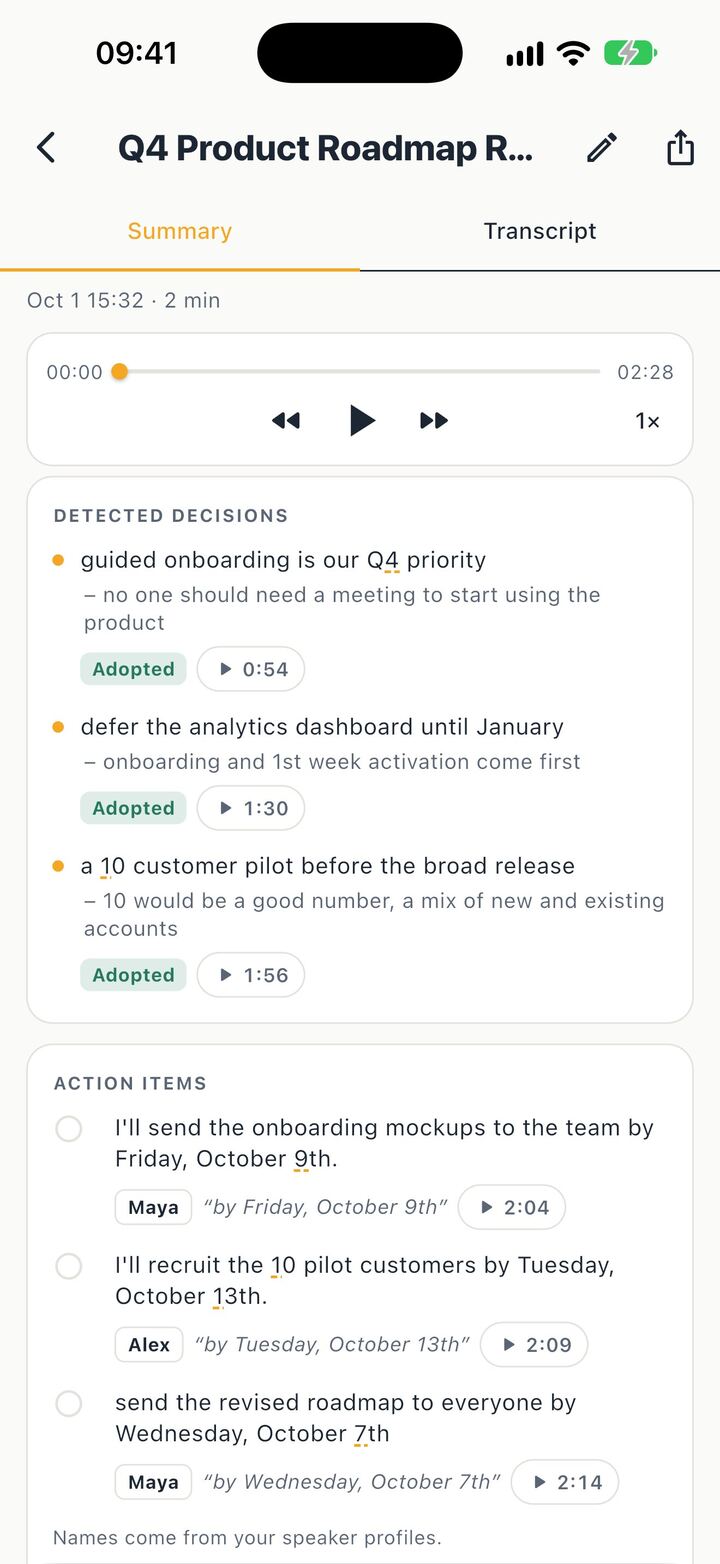
When you stop, Minuted writes the minutes: a summary, the decisions and the action items.
Decisions come with a status: Adopted, Proposed, Rejected, Deferred or Superseded. For a board that's the useful part, because it keeps an idea someone floated apart from what the board actually agreed, and an item pushed to next month doesn't read like a done deal. If two decisions contradict each other, Minuted points it out.
Action items come with an owner, taken from the speaker names, and the due date as it was said, like "before the next meeting". If nobody clearly took a task on, it says "Owner unclear" instead of guessing. Each one has a done checkbox for the next meeting.
How do you check the minutes are right?
Board minutes get read, approved and sometimes argued about, so you need to be able to check them. Every decision and action item links to the moment it was said. Tap the play link and you hear that part of the meeting. If you deleted the audio, you see the transcript line instead.
You can also search the transcript and play it at 1.5x or 2x. Or ask a question like "What did we decide about the parking rules?" across all your meetings. The answer points to the meeting and the moment, or says there isn't enough evidence.
Will it know who said what?
The first time, voices show up as speakers. Rename them once and Minuted recognizes those voices in later meetings, so next month an action item's owner shows up as "Maya" and not "Speaker 2". A board is the same few people every month, which is where this helps most.
How do you share the minutes with the board?
- Export the minutes as a PDF or as text, or share the audio file.
- Send the follow-up. Minuted drafts a follow-up email to the people invited in your calendar, with the decisions and action items.
- Add action items to Reminders. The owner goes in the note, and a due date is set only when you pick or confirm one.
- Snap the whiteboard or a slide during or after the meeting. The text on it is read on the iPhone, and Ask can find it later.
At the end of the year you can export every meeting at once: each one as Markdown with its minutes and transcript, plus the PDF and the audio, through the share sheet. That's an easy way to hand the archive to the next secretary.
What can't it do?
- It gives you a draft, not the approved record. The secretary still reads it and fixes it, and the board approves it like any other minutes. In a loud room, or with people far from the phone, names and dates get missed, so use the play links on anything that matters.
- There's no special field for motions, seconds or vote counts. If your minutes need them, say them out loud in the meeting and check them in the draft, or add them yourself.
- The minutes need an iPhone 15 Pro or newer with iOS 26. On an older iPhone, Minuted can't write them.
- Languages depend on the device.
Quick recap
Get the board's OK, put the phone in the middle of the table and record. Afterwards, go through the decisions and action items, check anything unclear with the play links, and send the draft around. You get to take part in the meeting instead of typing through it.
Minuted is on the App Store.