
Short answer: if most of your meetings happen around a table and not on a video call, Minuted is one Otter alternative to look at. It records on your iPhone, works without an internet connection, and writes the minutes with decisions and action items, each with an owner and the due date as it was said.
I built Minuted for my own in-person work meetings, so it's built around one job: a phone in the middle of the table and usable minutes afterwards. Otter does more than that, and for a lot of people it's the better fit. This page puts the two side by side so you can pick.
Who Minuted suits
- Your meetings are in a room: client visits, site meetings, board meetings, one-on-ones.
- Sometimes there's no signal, or the meeting is confidential and you'd rather not depend on a connection.
- You want the outcome (who does what, by when) more than a full transcript.
- You already have an iPhone 15 Pro or newer. That's what the minutes need.
If most of your meetings are on Zoom, Microsoft Teams or Google Meet and you want a note-taker that joins them, Minuted doesn't do that. Otter's pricing page lists joining those calls, so Otter is the one to try there.
Side by side
Otter column: what otter.ai's pricing page lists, as of November 2026. A row only appears when I could check it on Otter's own page.
| Minuted | Otter | |
|---|---|---|
| Record a meeting in the room on your phone | Yes, with a live transcript | Lists web and mobile recording |
| Joins Zoom, Teams or Google Meet | No, it records the room or works with files you import | Listed |
| Import recordings | Yes: Voice Memos, Files and iOS call recordings | Free (Basic) plan: 3 files per user, lifetime |
| Free plan | Recording needs a subscription | Basic: 300 transcription minutes a month, up to 30 minutes per conversation |
| Phones | iPhone (and iPad) only | iOS and Android apps |
| Transcription languages | Several, depending on your iPhone | English, Spanish, French, German, Japanese and Chinese |
Sources: the Minuted features I checked in the app, and otter.ai/pricing, read on November 12, 2026. Plans change, so check Otter's page for the current details.
What an in-person meeting looks like in Minuted
- Start the recording. Tap Record on the Today screen, or start it from Siri, the Control Center or the Action button. Minuted asks for consent before every recording and plays a short tone when it starts, so the room knows.
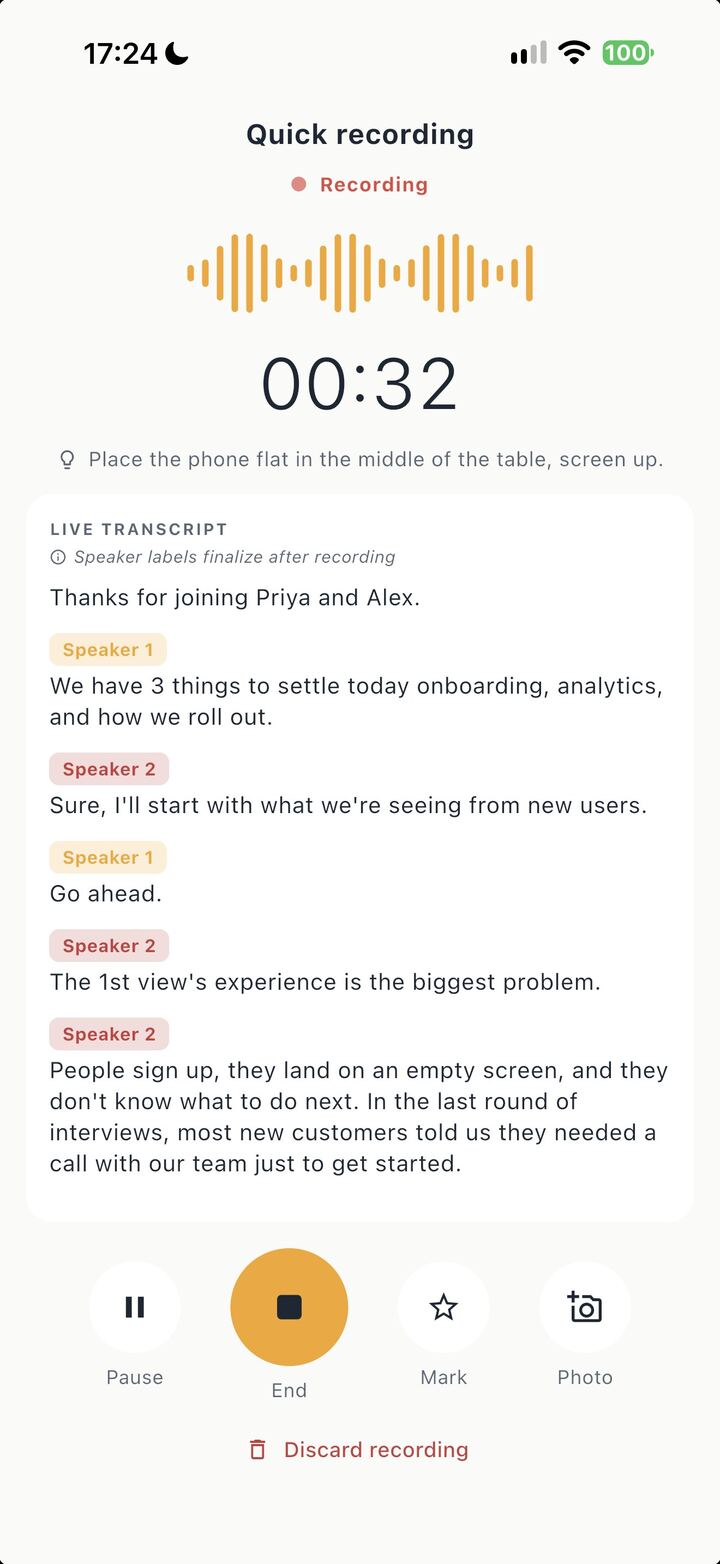
- Put the phone in the middle of the table. The live transcript runs while you talk, as in the screenshot above. You can snap a photo of the whiteboard or a slide during the meeting, and its text gets read too.
- Stop, and read the minutes. You get a short summary, the decisions with a status (Adopted, Proposed, Rejected, Deferred), and the action items with an owner and the due date as someone said it.
- Check anything that matters. Every decision and action item links to the moment it was said. Tap it and hear that part again.
- Send them. Minuted drafts a follow-up email to the people in the calendar invite. You can also export the minutes or transcript as a PDF or text, or add the action items to Reminders.
Name a voice once and Minuted remembers it, so next week's transcript says "Maya" instead of Speaker 2. Weeks later you can ask "what did we decide about the budget?" across all your meetings, and the answer points to the meeting and the moment, or tells you there isn't enough evidence.
All of this works without an internet connection, and the transcript and minutes are written on your iPhone.
The limits
- The minutes need an iPhone 15 Pro or newer with iOS 26. An iPhone 12 or newer gets recording, the live transcript, speaker names, import, search and export, but no minutes, decisions or Ask.
- No meeting bot. It doesn't join video calls.
- Audio quality matters. A phone in the middle of the table works. A phone in a pocket, or four people talking over each other, gives a weaker transcript, and the minutes are only as good as the transcript.
- It's a draft. Read it before you send it. If a meeting ended without a clear decision, the minutes have nothing to report there.
- Languages depend on your iPhone. Check that yours is supported before a meeting in a language you rely on.
Questions people ask
Is there an Otter alternative that works offline on iPhone? Minuted records, transcribes and writes the minutes without an internet connection.
Can I use Minuted for in-person meetings without a bot? Yes. That's what it's built for. You put the phone on the table and record the room.
Does Minuted work on Android? No. It's on iPhone and iPad only.
If your next meeting is in a room, try recording it with the phone on the table and read the minutes before you write anything yourself.
Minuted is on the App Store.