
Lots of people fall asleep to white noise. Fewer want it running until the alarm at 7 am, because they share the room, or the sound bothers them once they're half awake, or they just don't want the phone playing all night.
The answer is a sleep timer. Not every timer is equal, though. A sound that stops dead in a quiet room can be more noticeable than the sound itself. What you want is a timer that lowers the sound slowly, so it's gone before you notice it going.
We make Calm Loop, a sleep sounds app for iPhone, so the steps below use it.
What a good sleep timer should do
What to look for in any white noise app with a timer:
- A choice of lengths. Some nights 15 minutes is enough, other nights you need an hour or two.
- A fade-out. The volume should go down over a few seconds instead of stopping with a click.
- It keeps working with the screen off. If the sound stops when the phone locks, the timer is useless.
- You can see what's left without unlocking the phone. Checking the time left shouldn't mean a bright screen in your face.
How to set the sleep timer in Calm Loop
- Start a sound. Open Calm Loop, pick a sound from the library and tap play. Rain, ocean, fan and brown noise are all in there, sorted into Nature, Everyday and Noise.
- Open the sleep timer. On the player, tap the timer. A sheet slides up with the options.
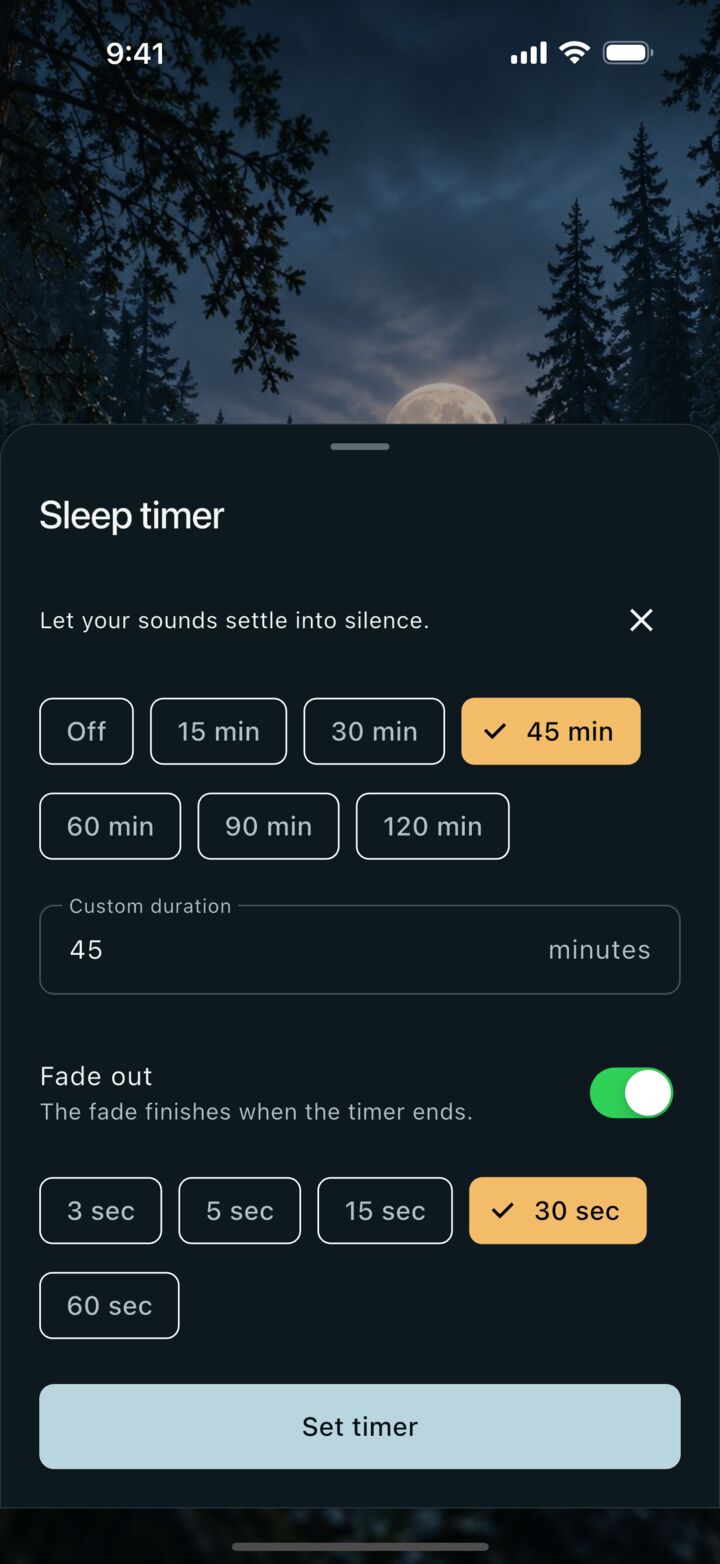
- Pick a length. Choose 15, 30, 45, 60, 90 or 120 minutes. If none of those fit, type your own length in minutes under Custom duration.
- Turn on Fade out. Pick how many seconds the fade lasts. The fade finishes exactly when the timer ends, so the sound is already quiet at the moment it stops.
- Tap Set timer. Lock the phone and put it down. The sound keeps playing with the screen off.
To stop the timer early, open the same sheet and choose Off.
Check the time left from the Lock Screen
While a sound or mix plays, Calm Loop shows a Live Activity on the Lock Screen and in the Dynamic Island. It shows the sound's name and the sleep timer counting down, and on iOS 17 or later it has play/pause and stop buttons. So if you wake up and wonder whether the timer is still running, a glance at the Lock Screen tells you, and you can stop the sound without unlocking the phone. The Live Activity ends on its own when you stop the sound or when the timer runs out.
Save the timer with your mix
If you use the same setup every night, don't rebuild it each time. Calm Loop's mixer plays two sounds together, each with its own volume, plus a master volume. Rain with a little distant thunder is a common one. When it sounds right, save it as a mix. A saved mix keeps its name, both sounds, their levels and, if you want, the sleep timer. The next night it's one tap: the sound starts and the timer is already set.
A few settings that go well with a timer
- Bedtime reminder. Pick the weekdays and a time, and Calm Loop reminds you to start winding down. It pairs well with a saved mix.
- Volume limit. Turn on Limit maximum volume in the settings if you want the app to stay below a certain level, for example when the phone is right next to your pillow.
- Offline. Every sound comes with the app, so the timer works the same on a plane or in a hotel with no wifi.
How long should the timer be?
There's no single right answer. A simple way to find yours: start with 30 or 45 minutes for a few nights. If you're still awake when the sound fades, go longer. If you never hear the fade, try shorter. Once it fits, save it in a mix so you stop thinking about it.
What to know before you start
- Calm Loop is an iPhone and iPad app here, and the app is in English.
- The mixer plays two sounds at a time, not more.
- The Live Activity buttons need iOS 17 or later. On iOS 16.1 to 16.x the Live Activity shows the countdown without buttons.
- Three of the 46 sounds come with the app, along with the night light, the four ambient music pieces and recording your own sound. The other 43 sounds, the bedtime stories and the guided relaxations come with Calm Loop Pro, a one-time unlock with no subscription. Every Pro sound has a 30-second preview, so you can hear it before you decide.
- A timer only controls how long the sound plays. It isn't a sleep tracker and doesn't measure your sleep.
Set it once, save it with your mix, and the sound takes care of turning itself off.