
Short answer: if you like the idea of a Plaud but don't want one more gadget to charge and carry, Minuted does the meeting part on the iPhone that's already in your pocket. It records the room, works without an internet connection, and writes the minutes with decisions and action items, each with an owner and the due date as it was said.
I built Minuted for my own in-person work meetings. I already had a good microphone with me in every meeting, it was my phone, so a separate recorder never made sense for me. That doesn't make Plaud the wrong choice. It does more than Minuted in some places, and this page puts the two side by side so you can pick.
Who Minuted suits
- Most of what you want recorded happens around a table: client visits, site meetings, team meetings, one-on-ones.
- You'd rather not buy, charge and remember another device.
- You want the outcome of the meeting (who does what, by when) more than a long transcript.
- You have an iPhone 15 Pro or newer with iOS 26. That's what the minutes need.
If you want a recorder you can wear, a separate device that also records phone calls, or a long list of transcription languages, Plaud is probably the better fit. Its own pages list all of that.
Side by side
Plaud column: what plaud.ai's own pages list, as of November 2026. A row only appears when I could check it there.
| Minuted | Plaud | |
|---|---|---|
| What you carry | The iPhone you already have | A separate recorder: card-shaped (Plaud Note, Note Pro) or wearable (NotePin, NotePin S) |
| Meetings in a room | Yes, with a live transcript | Listed (in-person recording mode) |
| Phone calls | Import an iOS call recording afterwards | Listed (phone call recording mode) |
| What you get | Minutes: a summary, decisions with a status, action items with owner and due date | AI summaries, with templates to pick from |
| Speaker names | Yes, and it remembers voices from meeting to meeting | Speaker labels |
| Transcription languages | Several, depending on your iPhone | 112 listed |
| Free plan | No, recording needs a subscription | Starter: 300 transcription minutes a month, included with every Plaud device |
| Where you read your notes | In the app on your iPhone, or exported as PDF or text | Plaud App, Web and Desktop, with cloud storage |
Sources: the Minuted features I checked in the app, and plaud.ai (home page, the Plaud Note product page and the plans page), read on November 19, 2026. Devices and plans change, so check Plaud's site for the current details.
What a meeting looks like with just your iPhone
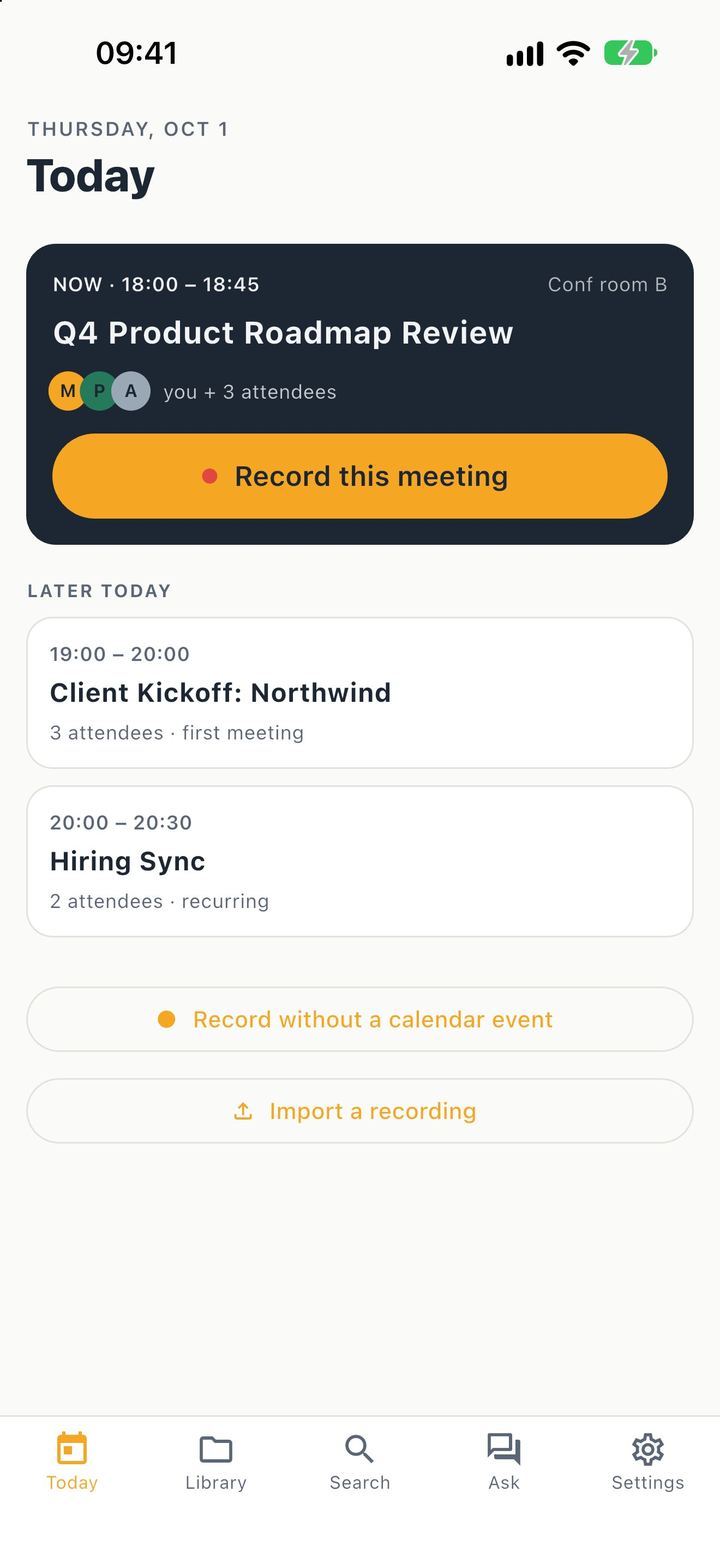
- Tap Record. The Today screen shows the meeting that's on your calendar now, with a Record this meeting button, as in the screenshot above. You can also start it from Siri, the Control Center or the Action button. Minuted asks for consent before every recording and plays a short tone when it starts, so the room knows.
- Put the phone in the middle of the table. The live transcript runs while people talk. You can take a photo of the whiteboard or a slide during the meeting, and its text gets read too.
- Stop, and read the minutes. You get a short summary, the decisions with a status (Adopted, Proposed, Rejected, Deferred), and the action items with an owner and the due date as someone said it.
- Check what matters. Every decision and action item links to the moment it was said. Tap it and hear that part again before you send anything.
- Send them. Minuted drafts a follow-up email to the people in the calendar invite. You can also export the minutes as a PDF or text, or add the action items to Reminders.
Name a voice once and Minuted remembers it, so next week's transcript says "Maya" instead of Speaker 2. All of this works without an internet connection.
Already have recordings from somewhere else? Minuted imports them from Voice Memos, Files and iOS call recordings. I wrote up how that works for call recordings and for Voice Memos.
The limits
- The minutes need an iPhone 15 Pro or newer with iOS 26. An iPhone 12 or newer gets recording, the live transcript, speaker names, import, search and export, but no minutes, decisions or Ask.
- It's your phone. While it records the meeting on the table, it's not in your hand. A dedicated recorder doesn't have that problem.
- No live call recording. For calls, you record them on your iPhone first and import the file.
- Audio quality matters. A phone in the middle of the table works. A phone in a bag, or four people talking at once, gives a weaker transcript, and the minutes are only as good as the transcript.
- It's a draft. Read it before you send it. If a meeting ended without a clear decision, the minutes have nothing to report there.
- iPhone and iPad only. There's no Android version.
Questions people ask
Is there a Plaud alternative that doesn't need a device? Minuted runs on your iPhone, so the phone is the recorder. The minutes need an iPhone 15 Pro or newer.
Does Minuted work offline? Yes. It records, transcribes and writes the minutes without an internet connection.
Can it record phone calls like Plaud's call mode? Not live. Record the call on your iPhone, then import the recording into Minuted.
If your next meeting is in a room, put your iPhone on the table and try it before you buy anything else to carry.
Minuted is on the App Store.